A cryptocurrency wallet is a tool that allows you to store, send,
and receive digital currencies. Despite the name, wallets don’t
actually store your coins—they store your private keys.
🔑 Public Keys & Private Keys
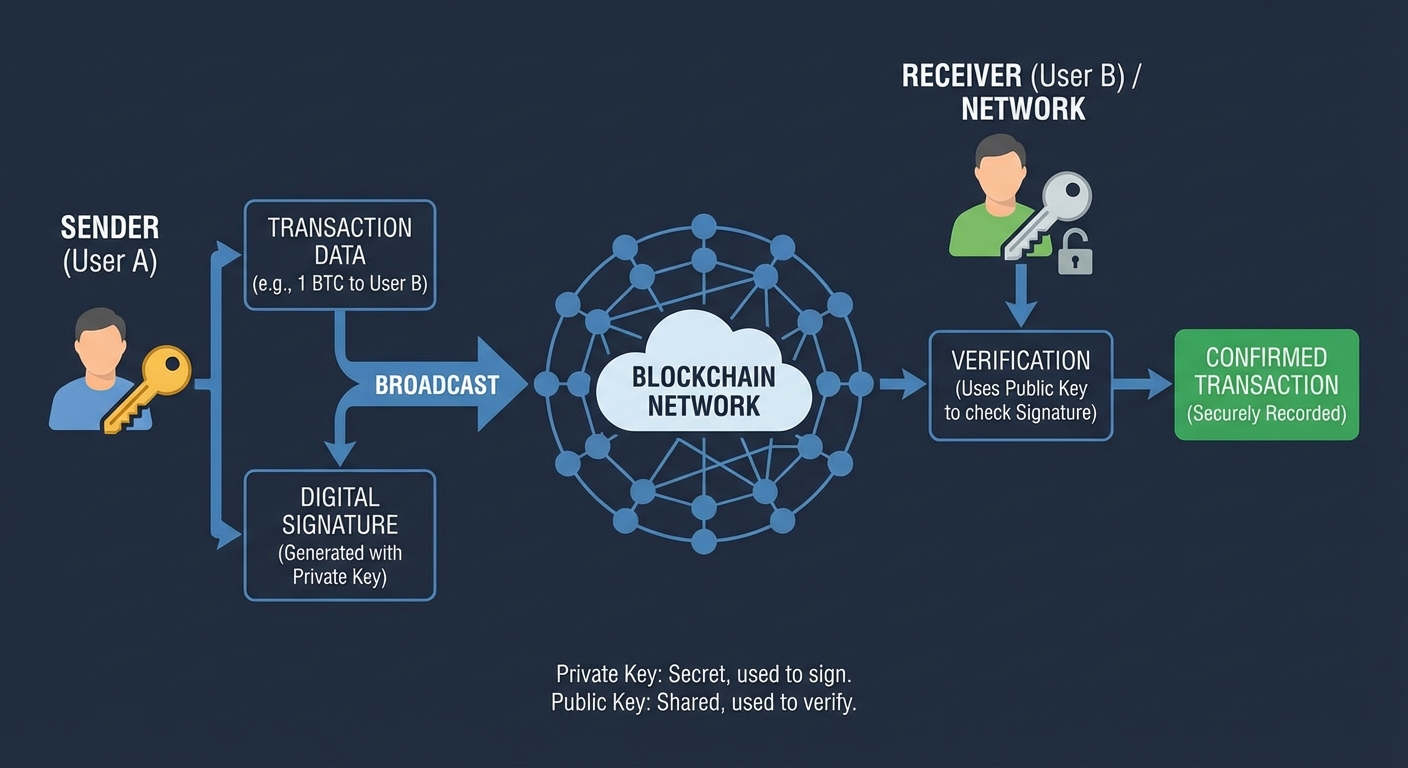
Every crypto wallet uses a pair of cryptographic keys. Understanding
these is critical to understanding how wallets work.
Public Key vs Private Key
Feature
🔓 Public Key
🔒 Private Key
What is it?
Your wallet “address”
Your secret password to the wallet
Who can see it?
Anyone – it’s public!
Only you! Never share it!
Analogy
Your email address
Your email password
Another analogy
Your bank account number
Your PIN code
Used to
Receive cryptocurrency
Send (authorize) cryptocurrency
Example format
1A1zP1eP5QGefi2DMPTfTL5SLmv7DivfNa
5HueCGU8rMjxEXx... (kept secret!)
“Not your keys, not your coins.”
— A popular saying in the crypto community
This means: if someone else holds your private keys (like an exchange),
they technically control your crypto. True ownership means
holding your own private keys.
Figure: How public and private keys work together
📱 Types of Wallets
There are several types of cryptocurrency wallets, each with pros and cons:
1. Software Wallets (Apps)
📱 Mobile Wallet
An app on your smartphone. Convenient for everyday transactions.
Examples: Trust Wallet, MetaMask Mobile, Coinbase Wallet
💻 Desktop Wallet
Software installed on your computer. More secure than mobile but less portable.
Examples: Exodus, Electrum, Atomic Wallet
🌐 Web Wallet
Accessed through a web browser. Most convenient but least secure.
Examples: MetaMask (browser extension), Blockchain.com
2. Hardware Wallets (Physical Devices)
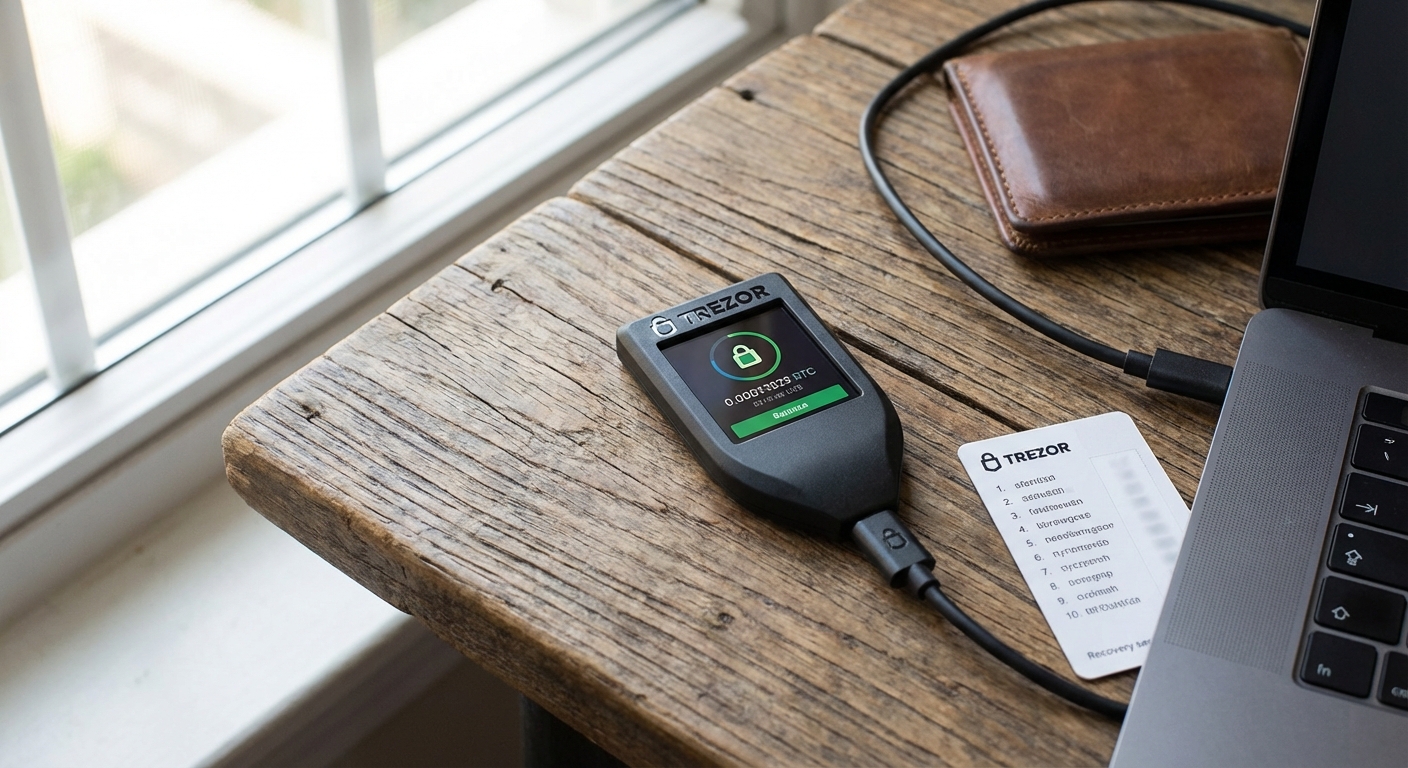
A hardware wallet is a physical device (like a USB stick) that stores
your private keys offline. This is the most secure option
for storing large amounts of crypto.
Popular hardware wallets:
Ledger Nano S / Nano X
Trezor Model T / Safe 3
3. Paper Wallets
A paper wallet is simply your public and private keys printed on paper.
It’s completely offline (no hacking possible!), but it can be lost, stolen,
or damaged.
=================================================
  YOUR BITCOIN PAPER WALLET
=================================================
  Public Address:
  1BvBMSEYstWetqTFn5Au4m4GFg7xJaNVN2

  Private Key:
  5HueCGU8rMjxEXxiPuD5BDku4MkFqeZyd4dZ1jvhTVqvbTLvyTJ
=================================================
  *** KEEP THIS SAFE! ANYONE WITH THE PRIVATE
  KEY CAN ACCESS YOUR FUNDS! ***
=================================================
4. Exchange Wallets (Custodial)
When you buy crypto on an exchange (like Coinbase or Binance), they hold
your keys for you. This is custodial—they control your crypto.
Convenient, but risky if the exchange gets hacked.
🔥 Hot Wallets vs ❄ Cold Wallets
Hot vs Cold Wallet Comparison
Feature
🔥 Hot Wallet
❄ Cold Wallet
Connection
Connected to the internet
Offline (no internet)
Examples
MetaMask, Trust Wallet, Exchange wallets
Ledger, Trezor, Paper wallets
Security
Lower (vulnerable to hacks)
Higher (immune to online attacks)
Convenience
Very convenient for quick transactions
Less convenient (requires physical device)
Best for
Small amounts, daily use
Large amounts, long-term storage
Analogy
Wallet in your pocket
Safe deposit box at a bank
💡 Best practice: Use a hot wallet for spending money
(like your physical wallet), and a cold wallet for savings
(like a bank vault).
🌱 Seed Phrases (Recovery Phrases)
A seed phrase (also called a recovery phrase or mnemonic phrase)
is a set of 12 or 24 random words that can be used to restore your
wallet if you lose access to it.
NEVER store it digitally (no screenshots, no cloud storage)
NEVER type it into a website (except your own wallet app)
DO write it on paper and store it in a secure location
DO consider using a metal backup (fireproof and waterproof)
💡 How does a seed phrase work?
Your seed phrase is used to mathematically generate all of your
private keys. From those private keys, your public keys (addresses) are derived.
So if you ever lose your phone or computer, you can enter your seed phrase
into a new wallet app, and it will regenerate all your keys and balances.
The words come from a standard list of 2,048 words (called BIP-39).
🛡 Wallet Security Tips
Use a hardware wallet for large amounts
Keeps your private keys offline and safe from hackers
Enable two-factor authentication (2FA) Use an authenticator app, not SMS (SIM swap attacks are real)
Back up your seed phrase Write it on paper, store copies in different secure locations
Beware of phishing Always double-check URLs and never click suspicious links